Broken index files
"SMITH, JOHN" without quotes becomes two columns. Three accounts share one row. Every row after the bad comma shifts.
IndexForge turns messy ECM exports into clean, verified import files for mergers, acquisitions and ECM migrations, into Hyland OnBase or any other ECM. Without a single byte of member or customer data leaving your network.
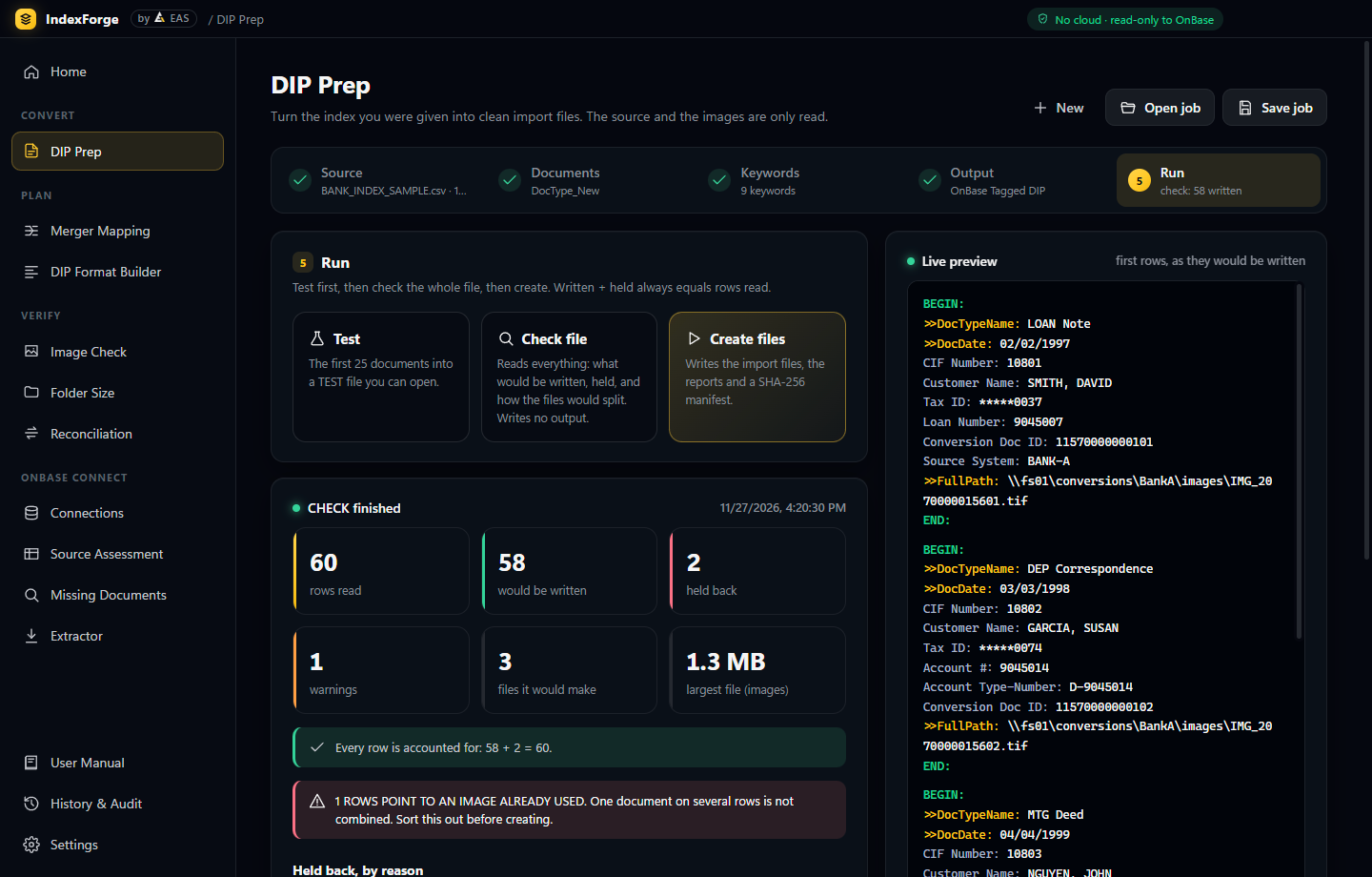
The documents are rarely the problem. The file that describes them almost always is, and every mistake surfaces months later in front of a member, a customer or an examiner.
"SMITH, JOHN" without quotes becomes two columns. Three accounts share one row. Every row after the bad comma shifts.
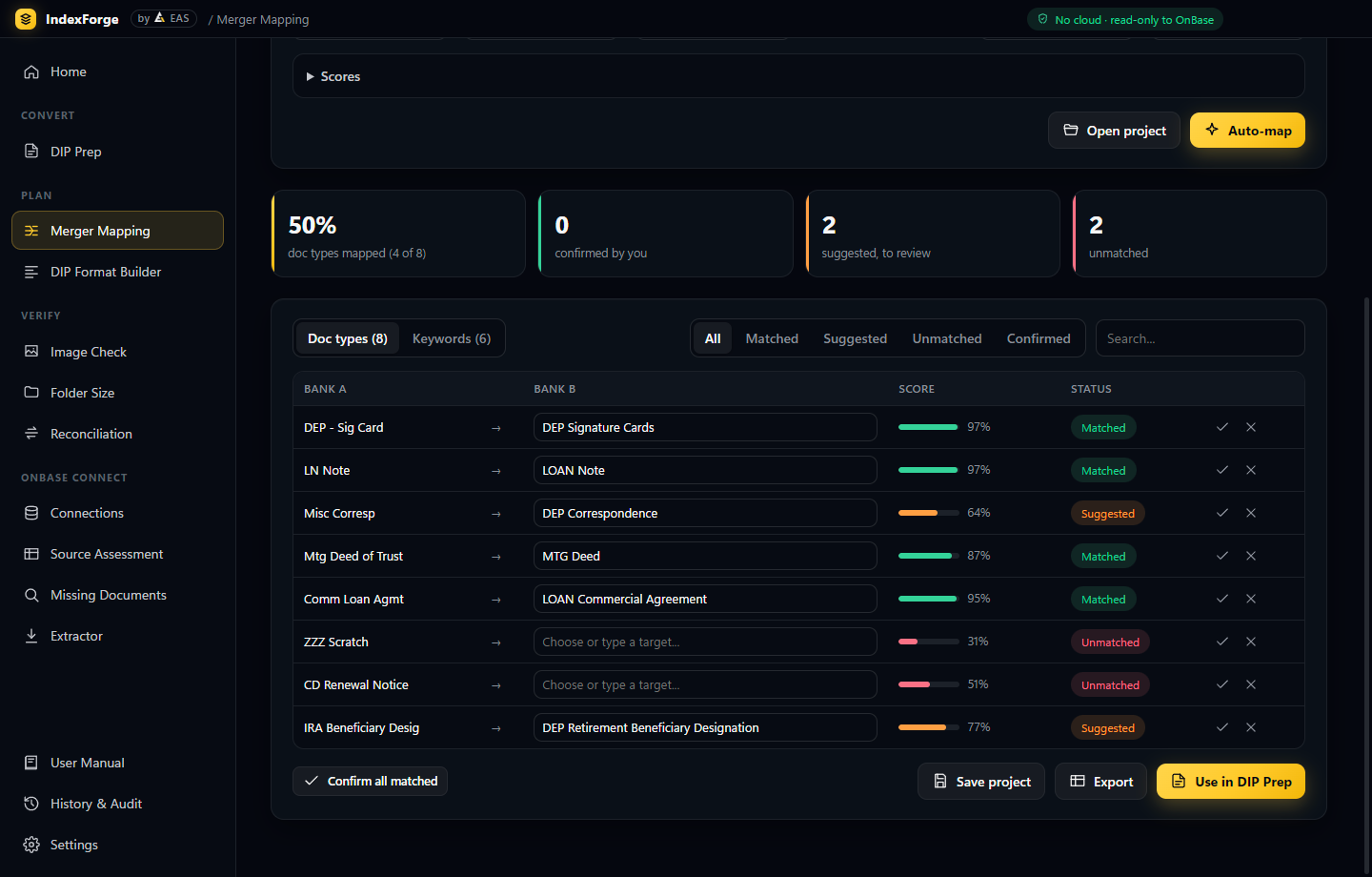
Bank A's "DEP - Sig Card" is Bank B's "DEP Signature Cards". Hundreds of these, matched by hand in emailed spreadsheets.
Files deleted outside the ECM, copies nobody knew about, two rows pointing to one image. Documents that never arrive, or arrive twice.
One blank in a multi-instance group and every later owner lands on the wrong address, with no error at all.
Names, Tax IDs and account numbers copied into scripts, spreadsheets and email attachments far beyond where they belong.
"Did everything come over?" Without a row-by-row account and a reconciliation, the honest answer is "we think so".
Every source is read into the same vendor-neutral document model. Rules run once, and writers produce whatever the receiving system imports.
CSV, tab or pipe, XML, fixed-width, folder trees or existing DIP files. Huge files are streamed.
Source doc types become target doc types. Keywords from columns, fixed values, templates or a sequence.
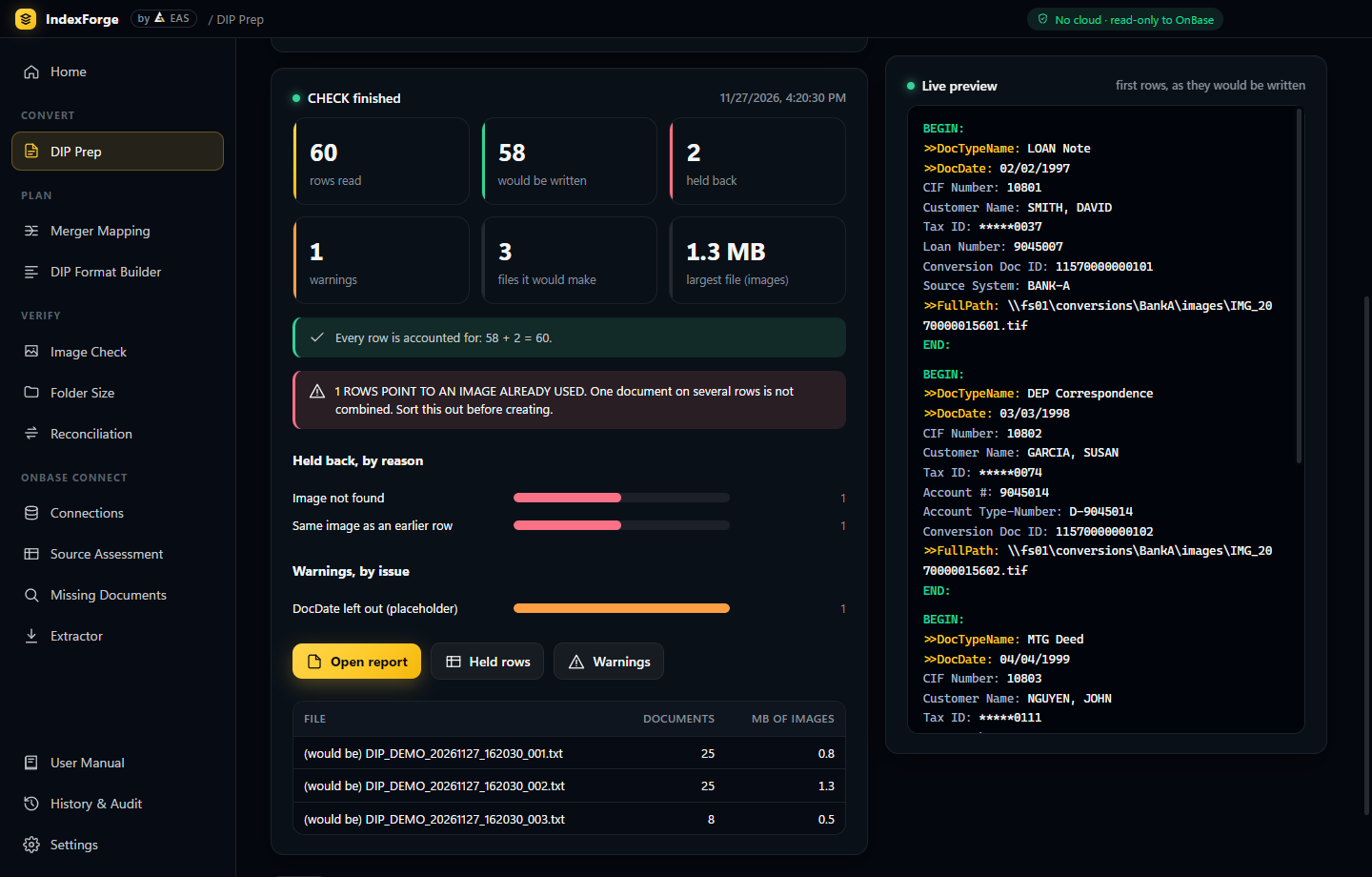
Repairs what is safe. Holds back what is not, with a plain-English reason. Never guesses.
OnBase Tagged or Ordered DIP, or a generic CSV or XML index for any ECM. Split by count or MB.
HTML report, held list, SHA-256 manifest, image checks and reconciliation against the target.
A guided five-step workflow with the result previewed live beside every setting, so mistakes show up in seconds, not after ingestion.
{Branch}-{Account} or a running conversion number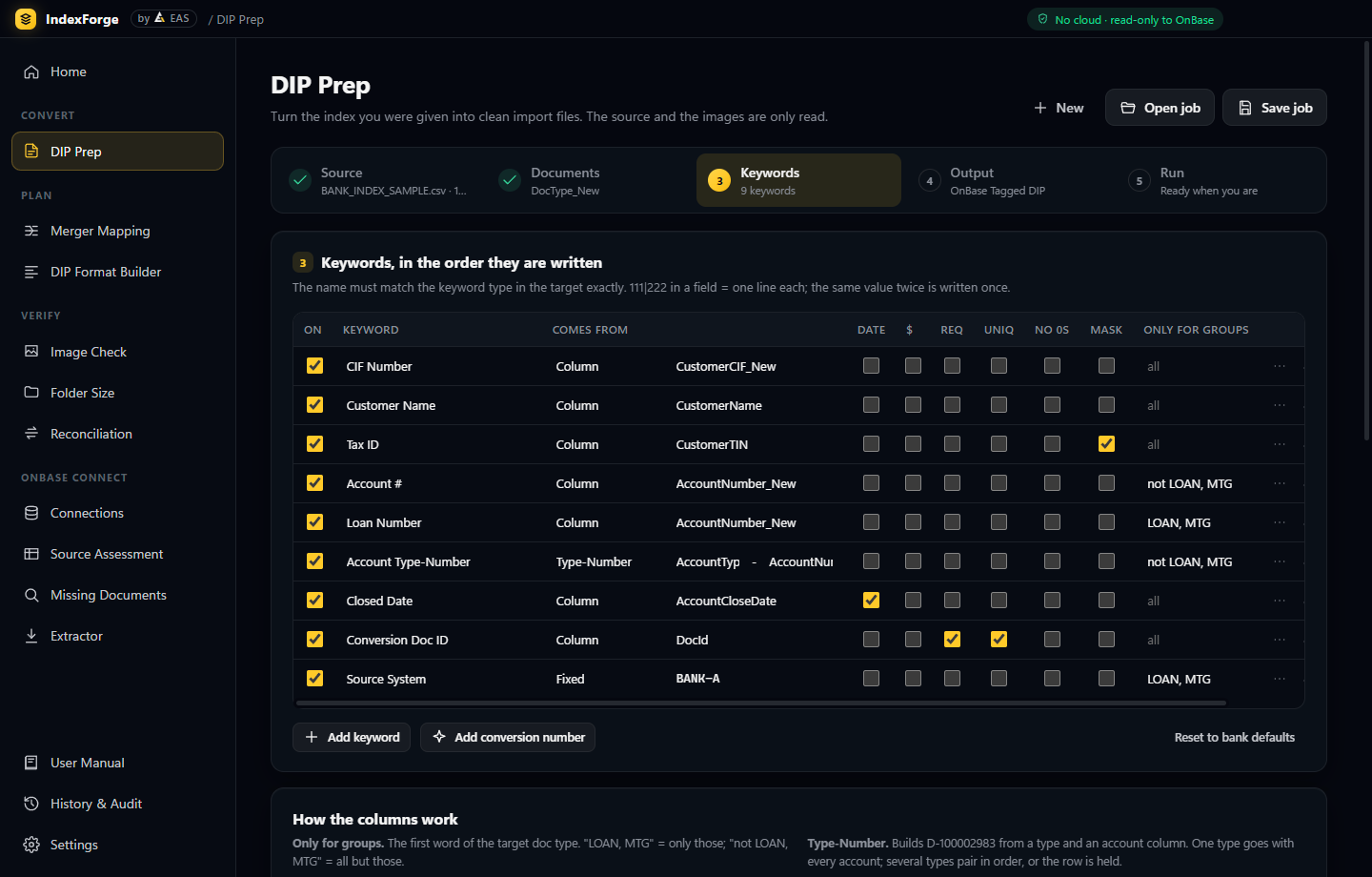
Load both banks' doc types and keywords. IndexForge scores every possible match and understands banking shorthand such as Acct, Sig, LN, Corresp and Agmt.
Every row is written, or held back with its reason. Image Check, Folder Size and Reconciliation answer: is it all there, is it the right size, did it all arrive?
Connect to an OnBase database on SQL Server or Oracle. Assessment, extraction and reconciliation happen in the same tool, with fixed SELECT statements only.
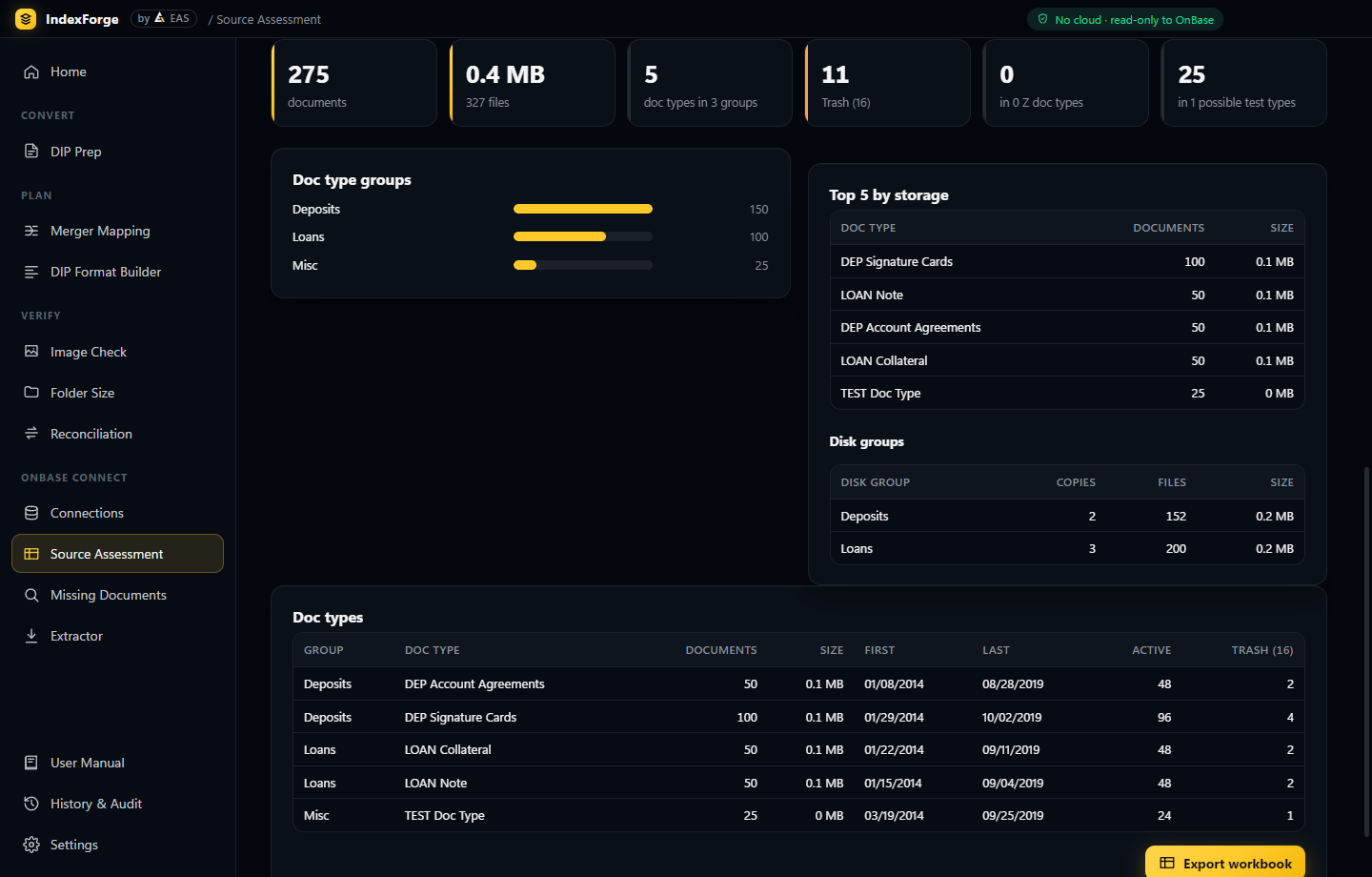
Index files hold names, Tax IDs and account numbers. IndexForge assumes none of it should ever leave the institution, or even the machine running the conversion.
No cloud service, no telemetry, no update channel. Only the connections you configure.
The window has no direct file or system access, only a short, fixed list of actions.
Tax IDs masked by default in previews and reports. Mask any column or keyword.
Files, images and OnBase are only ever read. Outputs are never overwritten.
A SHA-256 hash of every import file, so a mixed-up or altered file is caught before ingestion.
User, machine, time, source, output, counts and hashes for every run.
Designed to support the data-handling expectations institutions apply under GLBA Safeguards requirements and FFIEC IT guidance. IndexForge supports your controls and policies; it does not replace your institution's own review.
The acquired bank's documents move into the acquirer's OnBase, mapped, converted and reconciled.
Merger Mapping → DIP Prep → ReconciliationTwo charters become one. Member history is kept while doc types follow the continuing credit union's taxonomy.
Merger Mapping → DIP PrepLeave another ECM or imaging system. Its export is read as-is and turned into a ready-to-configure DIP process.
Any source → DIP Prep → DIP Format BuilderMove documents out to another platform, or hand a book of business to a buyer, as a clean vendor-neutral index.
DIP / export → Generic CSV or XMLCheck the bank's index, the extract and the share before a single file is imported, while there's still time.
Check → Image Check → Folder SizeA DIP failed or needs new keywords, paths or splits. Read it back in and re-write it, nothing typed by hand.
Existing DIP → DIP Prep → new DIPOne doc type group, such as deposit signature cards, and its index file.
Eyeball 25 documents, then Check the whole file and work the Held list.
Create the DIP files and import them into a test OnBase environment first.
Prove every document arrived, then scale to the full conversion.

See IndexForge run against an index file like yours. We'll walk through a Check run, the Held list and the evidence package your examiners will ask for.